Succulent Plant Teacup Design Bundle: A Practical Guide for Creators
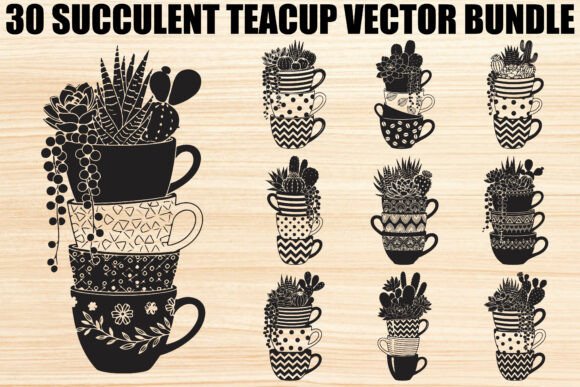
For crafters and small business owners, finding the right digital asset can be the difference between a project that feels professional and one that looks rushed. The Succulent Plant Teacup Design Bundle offers a specific aesthetic that blends botanical charm with the cozy nostalgia of stacked teacups. This collection features 30 decorative silhouettes where succulents and cacti spill from delicate cups, creating a motif that is both rustic and modern. Whether you are cutting vinyl decals, designing t-shirts, or preparing files for laser cutting, these vector graphics promise versatility. However, simply downloading a bundle is not enough to guarantee success. Understanding how to evaluate, prepare, and apply these files correctly is essential for achieving high-quality results.
Understanding the Value of Vector Silhouettes
The appeal of this bundle lies in its dual symbolism. Succulents represent resilience and growth, while teacups evoke comfort and creativity. When combined, they create a narrative perfect for boho artwork, handmade gifts, or invitations. But beyond the aesthetics, the technical format matters immensely. This bundle includes SVG, PNG, JPG, PDF, EPS, and AI files. For serious creators, the SVG (Scalable Vector Graphics) and EPS (Encapsulated PostScript) formats are the most critical. These are true vector files, meaning they can be scaled up to billboard size or down to a tiny logo without losing clarity or pixelation.
Many beginners overlook the importance of file formats, assuming a high-resolution JPG is sufficient for all projects. This is a common misunderstanding that leads to poor outcomes. If you attempt to cut a raster image like a JPG on a Cricut or Silhouette Cameo, the machine will struggle to trace the edges accurately, often resulting in jagged lines or failed cuts. By prioritizing the vector files included in the Succulent Plant Teacup Design Bundle, you ensure smooth cutting paths and crisp edges every time.
Common Mistakes When Using Digital Design Bundles
Even with high-quality assets, users frequently encounter issues due to improper workflow habits. One of the most frequent errors is neglecting to check the layer structure before sending a design to the cutter. Complex bundles often contain multiple layers, such as separate outlines for the teacup, the plant, and the soil. If these layers are not organized or if unnecessary background elements are left active, your machine may attempt to cut through areas you intended to leave blank. This wastes material and time.
Another oversight involves scaling. While vectors are scalable, some users stretch designs disproportionately. Imagine taking a delicate teacup silhouette and stretching it vertically to fit a tall mug. The proportions become distorted; the cup looks unnatural, and the succulents appear squashed. This destroys the artistic integrity of the design. Always use "maintain aspect ratio" settings when resizing your graphics to preserve the original balance of the composition.
Color management is also a frequent pitfall. Many designers download the PNG versions with transparent backgrounds and assume they are ready for print-on-demand services. However, screen colors (RGB) often differ significantly from print colors (CMYK). If you are printing physical products like posters or t-shirts, relying solely on what you see on your monitor can lead to dull or muddy final products. It is wise to convert your files to CMYK mode in your design software before finalizing any print job.
Optimizing Your Workflow for Better Results
To avoid these pitfalls, adopt a structured approach when working with the Succulent Plant Teacup Design Bundle. Before starting any project, open the SVG or AI files in your preferred design software, such as Adobe Illustrator, Inkscape, or Silhouette Studio. Take a moment to inspect the nodes and paths. Ensure there are no stray points or overlapping lines that could confuse your cutting machine. Clean, simple paths result in faster cutting speeds and higher precision.
Consider the material you are using. Vinyl decals require different blade settings than cardstock for scrapbooking or wood for laser engraving. The intricate details of the succulent leaves might require a slower cutting speed and a sharper blade setting to prevent tearing. Test your settings on a scrap piece of material first. This small step prevents wasting expensive materials on a flawed test run.
If you are using these designs for branding, such as logos for a small business, remember that simplicity often wins. While the full silhouette is beautiful, sometimes a simplified version—perhaps just the outline of the teacup with a single succulent—is more effective for small applications like social media avatars or embroidery patches. Don't feel pressured to use the entire complex design for every application. Adaptability is key to making these assets work for your specific needs.
Evaluating File Quality and Compatibility
Before committing to any digital purchase, including this bundle, verify compatibility with your existing tools. If you primarily use a Cricut Explore, the SVG files are your best friend. If you are a graphic designer working in a professional environment, the AI and EPS files offer the most flexibility for editing. Check that the bundle provides clean, closed paths. Open paths can cause fill errors in software or incomplete cuts on machines.
Also, pay attention to the resolution of the raster files if you plan to use them for non-cutting purposes. The bundle includes 30 high-resolution JPGs and PNGs. Ensure these meet the DPI requirements for your specific print project. Standard web graphics are often 72 DPI, but print usually requires 300 DPI. Since this bundle specifies high-resolution files, they should suffice for most standard print jobs, but always double-check the dimensions against your printer's capabilities.
Practical Applications and Creative Possibilities
Once you have prepared your files correctly, the possibilities are vast. These silhouettes are ideal for creating rustic décor items like wall art or framed prints. They work beautifully on mugs, adding a touch of nature to daily coffee rituals. For entrepreneurs, these designs can be applied to tote bags, stickers, or even packaging labels for eco-friendly products. The combination of plants and teacups resonates well with audiences interested in mindfulness, gardening, and home comfort.
When creating invitations or scrapbook pages, consider mixing the vector silhouettes with hand-drawn elements or textured paper scans. This adds depth and makes the final product feel more personal and less generic. The transparency of the PNG files allows you to overlay these designs onto photos or patterned backgrounds seamlessly, provided you have managed your color profiles correctly.
Final Thoughts on Making the Right Choice
The Succulent Plant Teacup Design Bundle is a robust resource, but its value depends entirely on how you utilize it. By avoiding common mistakes like ignoring file formats, neglecting layer organization, or failing to test cut settings, you can maximize the quality of your projects. Remember that the best designs are those that are thoughtfully adapted to their medium. Whether you are a hobbyist making gifts for friends or a professional launching a new product line, taking the time to understand the technical aspects of your digital assets will save you frustration and elevate your work. With careful preparation and a focus on quality, these 30 versatile designs can become the cornerstone of many successful creative endeavors.